


Renting a car can look simple until you are standing in an airport, juggling luggage, flight changes, insurance questions, and a pickup time that suddenly matters more than expected. I found the Hertz Rent-a-Car app most useful when I treated it as a planning tool rather than just a digital booking counter. It puts the rental search, reservation process, and trip details in one place, which makes the experience calmer when I prepare before leaving home.
This is a free Travel & Local app from The Hertz Corporation, aimed at people booking airport and local rentals across several vehicle types, including SUVs, vans, sports cars, electric vehicles, and trucks. Its broad vehicle selection is useful, but the real value is in building a repeatable routine: search early, compare pickup locations carefully, review the reservation before travel, and keep the app ready for the day of collection.
The app has earned a 4.7 average from around 50 thousand ratings and has passed one million installs. That level of adoption makes sense to me because it serves both occasional travelers and people who rent often for work. Still, it is not a universal replacement for every rental method. If you want to compare several companies at once, a broader travel marketplace may be more convenient. If you already know you prefer another rental provider, this app’s focused approach will not change your mind.
How I use the app from search to pickup
Starting with the right location
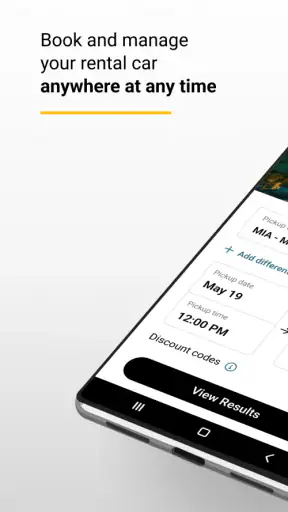
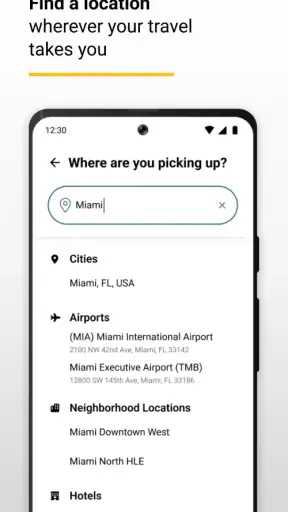
My first recommendation is to begin with the pickup location, not the vehicle. Airport and neighborhood branches can produce very different results, even when they serve the same city. An airport location may be easier after a flight, while a local branch could be more practical if I am already staying downtown or need to avoid returning to the terminal.
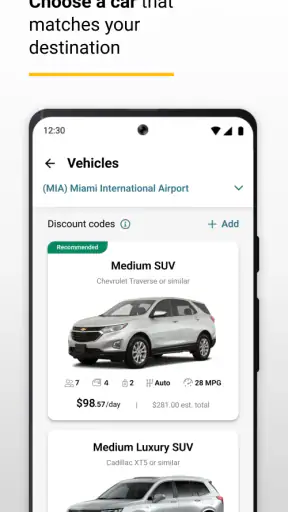
I enter the location and rental dates, then slow down before choosing a car. The appealing vehicle shown first is not automatically the best match for the trip. A compact car may be enough for a solo work visit, while a family with luggage needs to think about cargo space before focusing on the daily rate. The presence of SUVs, vans, sports cars, EVs, and trucks gives the search more range than a basic economy-only rental service, but that range also makes a realistic assessment more important.
For airport travel, I use the flight schedule as the anchor for my reservation planning. I do not choose a pickup time that assumes everything will go perfectly. Baggage delays, airport walking time, and the trip from the arrival gate to the rental area all affect how comfortable the reservation feels. A rushed pickup can turn a good price into a stressful start.
Reading the reservation before accepting it
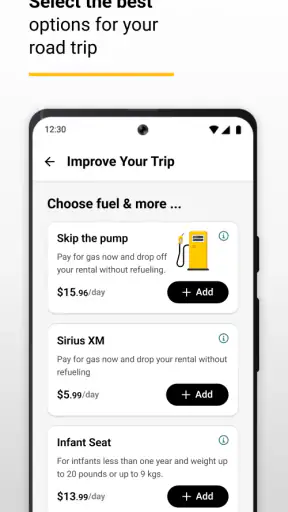
The booking flow is most helpful when I read each stage instead of tapping through automatically. I check the branch, pickup and return times, vehicle class, and the final terms presented during the process. This matters because a rental is not only about getting a set of keys; it is also about matching the reservation to my actual route and schedule.
I pay particular attention to whether I am collecting and returning at the same place. A one-way plan can be convenient, but it changes the practical value of the booking and may affect the overall cost or availability shown in the app. I also check whether the selected vehicle category suits the number of passengers and bags. Choosing an SUV simply because it looks comfortable can be wasteful for a short city trip, while choosing a small car for a long family journey can create discomfort that no saving justifies.
Before confirming, I take a moment to review the information displayed on the final screen. I want the dates and times to match my itinerary, especially when a flight arrives late at night or departs early in the morning. This simple pause is one of the most useful habits I developed with the app because correcting a mistake before confirmation is easier than explaining it at the counter.
Keeping the trip details accessible
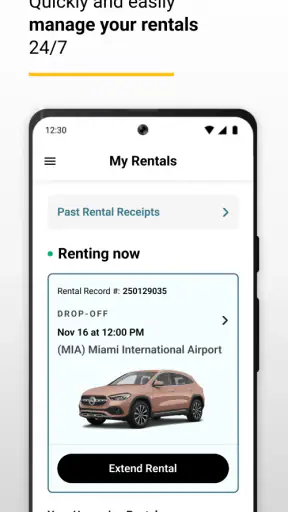
Once the reservation is made, I use the app as a reference point rather than relying entirely on memory or a confirmation email. Having the rental information available on the phone is convenient when I am moving through an airport or switching between travel documents. I still keep my broader itinerary available elsewhere, because a rental app is not a complete travel organizer.
On the day of pickup, I review the reservation again. This is especially worthwhile when plans have changed since booking. A small shift in arrival time can make the original pickup window less comfortable, and checking early gives me a chance to decide whether the reservation still fits. I do not assume that opening the app guarantees a faster counter experience; it mainly helps me arrive better prepared.
At return time, I follow the reservation details and branch instructions shown in the app, then keep records of the transaction and vehicle condition in the way I normally would. The app can organize the rental relationship, but it does not remove the need for ordinary care: checking the car, keeping receipts, and confirming that the return process is complete are still sensible habits.
A realistic airport example
Imagine I am flying into a city for a long weekend with two passengers and several bags. I would search the airport location first, compare a compact car with an SUV, and think about whether the extra space is genuinely useful for the route. If most driving is in a dense downtown area, the smaller option may be easier to park. If the trip includes outdoor equipment or long highway stretches, the larger class may be a better fit.
I would then choose a pickup time with room for the arrival process rather than setting it immediately after landing. Before confirming, I would check the return time against my departure plans and make sure the chosen branch is the one I actually intend to use. That workflow sounds basic, but it prevents the common mistake of selecting a car first and discovering later that the location or timing is inconvenient.
Who benefits most from this workflow?
I think the app is strongest for travelers who already know they want Hertz and prefer to manage the reservation directly. Business travelers can use the same sequence repeatedly, while families benefit from seeing vehicle categories before arriving at the branch. It is also useful for someone who wants a specific type of rental, such as an EV or truck, instead of accepting whatever a general booking site happens to display.
It is less compelling for a person who is still deciding among many rental companies. A comparison service can show competing providers in one search, which may be better when price shopping is the main goal. This app is a direct channel to one company, so its advantage is a more focused booking relationship rather than a complete market overview.
Settings and choices worth checking
The most important “settings” here are the choices that shape a reservation. I check location, dates, times, vehicle category, and return arrangement with the same care I would give to a hotel booking. The app’s current version is 5.3.1, and it supports devices running Android 8.0 or later, so compatibility is worth checking before a trip if I am using an older phone.
I also think about how I will use the phone during travel. A rental process is easier when the device is charged, the app is already installed, and the reservation details are easy to reach. I do not wait until I am standing beside the baggage carousel to install or explore it. Preparation is not a flashy feature, but it has a direct effect on how smoothly the app works in real life.
When selecting a vehicle, I treat the category as a practical decision rather than a reward. An EV may suit a route with convenient charging plans, but it requires more thought than a conventional car if the itinerary is unfamiliar. A truck can be the right tool for a specific task, yet excessive for ordinary passenger travel. The app makes these categories available, but it cannot decide which one fits my journey better than I can.
I also review the age guidance before recommending the app to a household. It is rated for Everyone, which makes it broadly suitable as an app, although the rules and requirements of renting a vehicle are a separate matter. I would never confuse an app’s content rating with eligibility to rent a car; those are different questions that must be handled during the booking and rental process.
Shortcuts that make repeat rentals easier
My fastest pattern is to repeat the same checklist every time: branch, dates, times, vehicle class, return plan, and final review. I do not rely on recognizing a familiar screen because one changed date can affect the entire reservation. A consistent checklist is faster than correcting an avoidable error.
For regular work travel, I search using the actual branch I expect to use instead of simply entering the city name. This reduces the chance of selecting a location that is technically nearby but inconvenient for the meeting or hotel. I also decide the required vehicle class before opening the search. That prevents me from losing time comparing attractive but unnecessary options.
Another useful habit is separating “must have” from “nice to have.” If I need room for equipment, that is a must-have. A sportier model may be enjoyable, but it should not distract me from the route, luggage, or parking situation. This approach is particularly helpful because the app covers a wide range of vehicle types, and more choice can otherwise make the booking slower rather than quicker.
I keep the app available throughout the trip, but I do not treat it as my only record. I save the reservation information in the way that fits my travel routine and keep important documents accessible independently. This is a sensible safeguard for any travel app: a phone battery, connection, or login problem should not leave me without the information I need.
Where the app saves time, and where it does not
The direct booking approach saves time when I have already chosen Hertz. I do not have to move between unrelated company pages, and I can focus on the locations and vehicle categories offered through this service. For a repeat renter, that familiarity can make the process feel more predictable.
However, direct booking is not the same as automatic savings. If I care only about finding the lowest available deal across the entire market, I would compare alternatives before committing. A travel marketplace may be better for that first-stage search, while the Hertz app becomes more useful once I have decided that Hertz is the right provider.
The app also cannot eliminate branch-level realities. Vehicle availability, queues, traffic, and the time needed to inspect or collect a car are part of the physical rental experience. I see the app as a way to reduce planning friction, not as a promise that every handoff will be instant.
Advanced expectations and practical limits
Experienced users should understand the boundary between digital convenience and rental responsibility. The app can help me organize a booking, but I still need to read the conditions presented during the reservation, choose times I can realistically meet, and understand what I am agreeing to. I do not skip those details simply because the interface feels familiar.
Vehicle categories also require realistic expectations. Selecting an EV does not automatically solve charging, and selecting a larger vehicle does not guarantee that every parking space or narrow street will be comfortable. A sports car may suit a leisure trip but be a poor choice for a family carrying luggage. The app offers the choice; the trade-off remains mine.
Another limit is that the app is not a substitute for a human conversation when a situation becomes unusual. A complicated route, a major schedule disruption, or a question about rental requirements may need direct assistance. I would use the app to check the reservation first, then seek the appropriate support rather than repeatedly searching the same screens.
I also avoid assuming that the most visible option is the only relevant one. I compare locations and categories deliberately, and I revisit the plan when my itinerary changes. This is where experienced use differs from casual use: the advantage comes from preparation and careful choices, not from tapping faster.
My final view after using it as a travel tool
I recommend Hertz Rent-a-Car to someone who wants a focused way to book directly with Hertz and manage the practical details of a rental from a phone. The free price makes it easy to try, and the Everyone content rating keeps the app broadly approachable. Its strong average rating and large installed base also suggest that many travelers find the experience dependable enough for regular use.
My recommendation is strongest for airport travelers, business renters, families comparing vehicle space, and anyone interested in categories beyond a basic small car. The app is also a good fit for people who value a repeatable routine and would rather work within one rental company’s system than compare a long list of providers every time.
I would choose another starting point if my first priority were comparing every rental company, finding the cheapest market-wide option, or arranging a trip with unusual requirements that need detailed personal guidance. In those cases, a marketplace or direct conversation may be more efficient. The app’s focused design is its strength, but also its clearest limitation.
After using it, my best advice is simple: search by the real pickup branch, choose the vehicle for the actual trip, allow breathing room around flights, and read the final reservation carefully. Those habits turn the app from a basic booking screen into a useful part of a travel routine. Its best feature is not merely booking a car; it is making the decisions around that booking easier to repeat and check.
For me, that makes Hertz Rent-a-Car a practical companion when the provider is already decided. It does not replace comparison shopping or common sense at the counter, but it gives a clear path from planning to pickup and keeps the rental process close at hand when travel becomes busy.


